

If you need to create certificates from Airtable data ActiveMerge offers a simple, repeatable workflow. You design one template, connect it to your Airtable records, map the fields, and generate finished documents automatically.
For teams handling classes, training programs, events, or membership records, this cuts down on copy-and-paste work. It also reduces the risk of mistakes.
How to Generate Certificates from Airtable with ActiveMerge
The process begins with a certificate template built in Google Slides or PowerPoint. The template includes placeholders for the key information: name, course, location, date, signature, and certificate ID.
On the data side, the Airtable base contains those same fields for each person. Once the template and database are aligned, ActiveMerge handles the rest.
You can view the video demo here.
Start with a Template That Matches Your Data
The template is the first decision that matters. In this case, the certificate uses a simple slide layout with clearly defined placeholders.
That matters because the template is the foundation for every generated document. If the structure is messy, every output will be messy too.
The template included:
- recipient name
- course name
- location
- date
- signature
- certificate ID
The list is small on purpose. You can store more data in Airtable, but only the fields needed for the certificate must be mapped into the document.
A focused template is easier to manage. Build the certificate first, then make sure your Airtable fields match the information it needs. You do not need a complicated setup to get a professional result.

Keep the Airtable Base Clean and Purposeful
On the Airtable side, each record represents one certificate recipient. The base contains the same fields used in the template, along with a few extras where needed.
In the demo, the fields included the recipient’s name, course, location, date, signature, and certificate ID.
That structure gives you two advantages.
First, it keeps the data organized in a way that is easy to generate from. Each record is complete on its own, so the document generator can pull everything it needs without guessing.
Second, it gives you flexibility. You can store additional columns in Airtable without affecting the output. The certificate only uses the fields mapped into the template.
Many document workflows get clumsy when the source data is overbuilt or under-structured. Then people spend time fixing formatting issues later.
The cleaner approach is to treat Airtable as the source of truth. If the data is accurate and consistent there, the generated certificates will be accurate and consistent too.
Connect the Template with ActiveMerge
Once the template and Airtable fields are ready, the ActiveMerge setup is mostly configuration.
The account requires an API key and a template ID. The API key is created from the integrations area, and it can only be viewed once when it is generated. If you lose it, you need to generate a new one.
The template ID comes from the template itself. You can preview the template, click the ID, and copy it to your clipboard. Then paste it into the ActiveMerge configuration.
In this example, the output format is PDF. That works well for certificates because PDF files are easy to share, archive, and print without layout changes.
The generated files are inserted directly into an attachments field in Airtable. That keeps everything attached to the relevant record instead of scattered across folders or downloads.
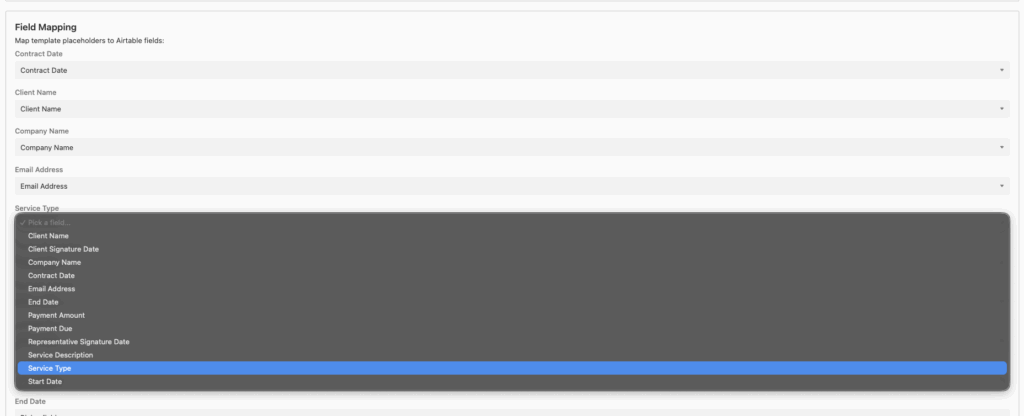
Field mapping is the final step. In ActiveMerge, you match the placeholders in the template to the Airtable fields. If the names are identical, the system matches them automatically. If they are not, you can map them manually.
That flexibility is useful when your internal field names do not perfectly align with your document labels.
Generate the Documents and Check the Results
Once everything is mapped, generating documents is simple. Click generate documents, wait a short time, and the certificates appear in the attachments field of the Airtable records.
In the demo, three certificates were generated successfully:
- Clark Kent, who completed journalism in Boston on March 1
- Peter Parker, who completed photography in New York
- Bruce Wayne, who completed investments in Gotham
This shows the main value of the workflow: one action creates multiple finished files, each customized to the corresponding record.
Instead of editing certificates one by one, the system fills in the data automatically and stores the output where you need it.
The workflow is also easy to test before you rely on it for real documents. ActiveMerge allows testing with up to 25 documents directly, and previews are free.
That gives you room to verify the layout, catch data errors, and confirm that the placeholders are replaced correctly before you generate final files.

Why This Airtable Workflow Works
This setup works because each part has a clear job.
- Google Slides handles the design.
- Airtable stores the structured data.
- ActiveMerge connects the two and produces the final documents.
That separation keeps the process manageable. You do not need to redesign every certificate manually. You do not need to copy data into a new file each time.
You also do not need to guess whether the output will match the template. The template stays fixed while the data changes.
The workflow scales well for simple certificate generation. Whether you have one certificate or one hundred, the structure stays the same. Update the records, run the generator, and save the files in the attachment field.
FAQ
What do I need to create certificates with ActiveMerge and Airtable?
You need a document template, an Airtable base with the relevant fields, an ActiveMerge account, an API key, and a template ID.
Do the field names have to match exactly?
No. If the placeholder names and Airtable fields match, the system can map them automatically. But you can also map fields manually if the names differ.
Can the output be generated as a PDF?
Yes, the documents can ve configured to generate as PDFs.
Can I merge multiple PDFs into one document in order?
Yes, you can use our merge files feature that includes an Airtable integration as well.
Where do the generated files go?
The generated files are saved into an attachments field in Airtable or can be saved in the ActiveMerge cloud.
Can I test the workflow before generating real certificates?
Yes. You can test up to 25 documents directly, and previews are free, which makes it easy to check for mistakes first.
Final Takeaway
If you need a reliable way to generate certificates from Airtable data, this workflow keeps the process simple. Design one template, connect your data, map the fields, and generate the files automatically.
It saves time, reduces manual work, and gives you a repeatable system you can test before using it at scale.

