
Document Generation Software
Generate PDF, Word (Docx), Excel (Xlsx), and PowerPoint (Pptx).
Generate documents easily with ActiveMerge, the best document generation software for your business.
Add your data (Excel, CSV, or JSON), add the template (Word, Excel or PowerPoint), and merge to generate hundreds or thousands of documents automatically.
You can generate:
- contracts
- letters
- invitations
- invoices
- certificates
- reports and more.
Our document generation software generates files in formats like PDFs, Word (Docx), Excel (Xlsx) and PowerPoint (Pptx).
Mail Merge Excel with PowerPoint
Connect with your current tech setup via our integrations: Make, Zapier, WordPress, Airtable and more.

How Our Document Generation Software Works
Add a Data Source
Add your data in Excel format as XLSX or XLS or connect via the API or our integrations. The headers will act as placeholders in the template.

Add Template
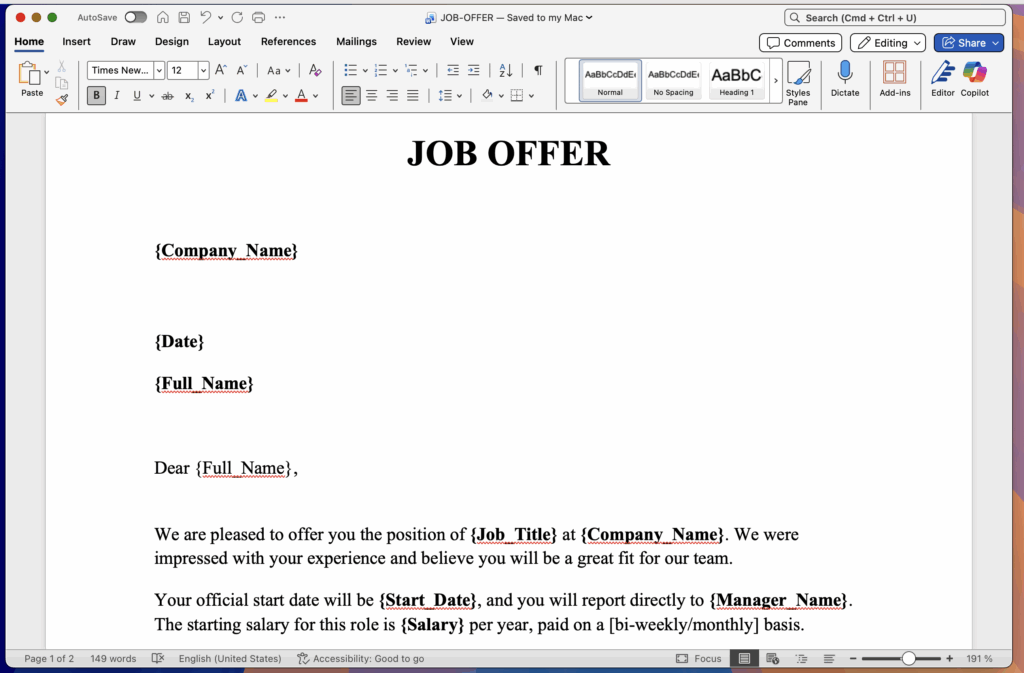
Prepare your template or use one of our own. {Placeholders} in your template will be replaced by the data in the source file. Supported templates formats are Word and Powerpoint.
Preview and Generate
To test if everything is ok you can always preview the first file free. If all the details are ok you can now generate the documents in bulk.

Features you will love
- Creating templates is simple by using {placeholders} in your documents.
- ActiveMerge supports data sources like JSON, Excel, and CSV.
- Use OCR to extract data from PDF and images as a data souces, think invoices.
- Create unlimited document templates in Word and Powerpoint with our powerful document generation software.
- Create Workflows that allow the generation of multiple documents with the same set of data.
- Save documents as PDF, Word or Powerpoint.
Using Our Integrations
ActiveMerge integrates with Zapier, Make, and Airtable. You and thousands of apps that can be connected with their ecosystem.
It allows you to create workflows and connect with apps you already love, from Google Sheets and Drive to CRMs and Dropbox or esignature software.
ActiveMerge also integrates with WordPress usign the Contact Form 7 and GravityForms plugins.
Using the API you can connect with any app.
Built for Security, Designed for Trust
Your data is encrypted in transit and at rest, processed on EU servers, and automatically deleted after document generation. No human ever touches your files.
Encrypted at Every Step — AES encryption at rest and TLS encryption in transit protect your data from start to finish.
Hosted in Germany, EU — Servers powered by Hetzner and DigitalOcean in Germany, respecting EU privacy regulations.
Auto-Deleted in 24 Hours — Generated files are automatically purged from our servers within 24 hours. Source data is never stored.
GDPR & CCPA Aware — Built with EU and international data protection principles in mind. Read our GDPR policy.
Frequently Asked Questions
1. What is ActiveMerge?
ActiveMerge is an online document generation and automation platform. It enables you to merge structured data (from Excel, CSV, JSON, OCR-extracted text, etc.) with templates (Word, PowerPoint) and produce large volumes of documents (PDF, DOCX, PPTX) in seconds.
2. What kinds of documents can I generate with ActiveMerge?
You can create a wide range of documents, including contracts, letters, invitations, invoices, certificates, reports and more.
3. What formats are supported for templates and output?
-
Templates can be in Word (.docx) or PowerPoint (.pptx).
-
Output can be generated as PDF, Word (DOCX) or PowerPoint (PPTX) documents.
4. What kinds of data sources can ActiveMerge work with?
ActiveMerge supports data sources such as Excel (XLS/XLSX), CSV, JSON, and even data extracted via OCR from PDF/images.
5. How does the process work – what are the basic steps?
Typically the workflow is:
-
Upload or connect your data source (Excel, JSON, etc.).
-
Add or upload your document template (with placeholders like {FieldName}).
-
Preview a single document to verify mapping and layout.
-
Generate the documents in bulk (hundreds or thousands) or trigger automatically via workflow.
6. Can I automate document generation so it happens without manual intervention?
Yes — by using the “Workflows” feature you can define a single data source and multiple templates to generate many documents in one go, or trigger from integrations/automation tools.
7. What integrations are available?
ActiveMerge integrates with tools including:
-
Zapier (connecting to 2,000+ apps)
-
Make (formerly Integromat) Airtable (as data source) WordPress (via plugins such as Contact Form 7 and GravityForms)
Airtable
-
API — you can integrate with any custom app or CRM.
8. Is this tool suitable for large-scale generation (e.g., thousands of documents)?
Yes — the platform supports bulk generation of documents. You can generate “hundreds or thousands” of documents in seconds once set up.
9. What about data security and compliance?
ActiveMerge states it has secure file management, industry-level encryption and is compliant with EU and international data protection standards.
10. Can I try it before committing or test it?
Yes — you can preview your documents for free to verify that data mapping and layout are correct before bulk generation. We also offer a free account has 50 free credits to test.
11. What kind of support and services are offered?
-
Standard support is available (via support@activemerge.com).
-
Additionally, consulting and setup services are available (template conversion, integration setup) for an extra fee.
12. Who is this tool best suited for?
It is ideal for any business or organization that needs to generate large volumes of documents consistently and efficiently — such as HR departments (contracts/certificates), legal firms (agreements, filings), finance teams (invoices, expense reports), educational institutions (certificates), and more.
13. What happens if my templates or data change frequently?
Because you use placeholders in your template that map to data fields, you only need to update the template once (or swap it in) and reuse your consistent data source. For changes in the data source structure you can update field mappings accordingly. The platform’s workflow and template versioning support this kind of change.
14. Can the generated documents be edited afterwards?
Yes — if you output a Word document (DOCX) you can further edit it manually if needed. Or you can output PDF if you want a finalized format that is not easily editable.
15. Is there a cost or pricing model I should know about?
Pricing details are available on our pricing page.