
Merge Multiple Files Into a Single Document
Merge local PDFs, DOCX files, text files, and JPG/JPEG/PNG images into one PDF. Keep DOCX-only collections editable by creating a DOCX or ePUB.
Or connect Airtable to merge PDF attachments from selected records in a predefined order and save the finished PDF back to each record.
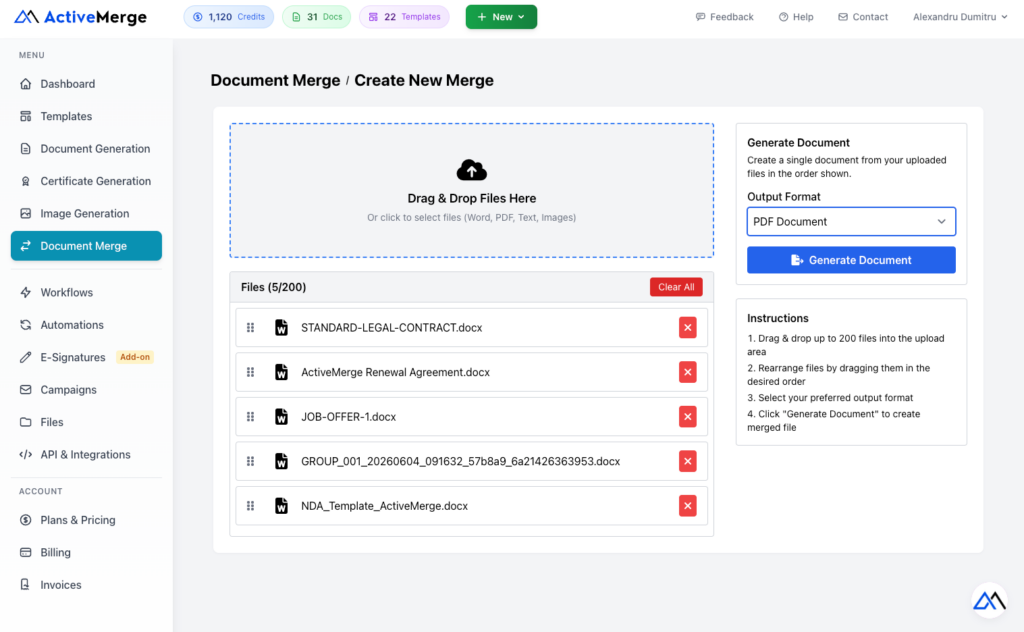
Three Output Formats
PDF accepts supported local file types. DOCX and ePUB are available when every uploaded file is a DOCX document.
The universal choice. Merge PDFs, DOCX files, text files, and JPG/JPEG/PNG images into one PDF that looks identical on every device.
- Accepts PDF, DOCX, TXT, JPG/JPEG, and PNG
- Also used for Airtable PDF attachment merges
- Ideal for sharing and printing
Word Document (DOCX)
Keep your document editable. Merge Word files with all styles, fonts, tables, and layout fully preserved.
- Accepts DOCX files only
- Fully editable in Word or Google Docs
- Control page breaks, numbering, and headers
ePUB (eBook)
Combine Word documents into a single publish-ready eBook file compatible with all major e-readers.
- Accepts DOCX files only
- Compatible with Kindle, Kobo, Apple Books
- Ideal for long-form publishing
How It Works
Merge your documents in four simple steps.
01
Set the Source and Order
Choose local files or Airtable. Local PDF output supports PDF, DOCX, TXT, JPG/JPEG, and PNG files, each up to 20 MB.
02
Arrange in Order
For local files, drag items into the final order. For Airtable, choose one attachment field with multiple PDFs or multiple attachment fields; selected fields are merged in the order you set.
03
Choose Your Format
Select PDF for local mixed file types or Airtable attachments. DOCX and ePUB are available for DOCX-only local uploads.
04
Generate and Download
Generate the merged file. Airtable batches are queued, processed in the background, and write the resulting PDF back to your chosen attachment field.
Everything You Need to Merge Documents
Built for professionals who merge files regularly — in a browser or via API.
- Local File Merge – Merge up to 200 supported local files per operation, each up to 20 MB.
- Airtable PDF Merge – Select records from an Airtable base, including a saved view, and merge their PDF attachments.
- Predefined Field Order – Use one field with several PDFs or set the order across multiple attachment fields.
- Write Back to Airtable – Save the generated PDF to an attachment field on the same record.
- Batch Processing – Queue up to 50 Airtable records per batch, with clear progress and result history.
- Search and Page Records – Browse Airtable records 100 at a time and search the current page before selecting records.
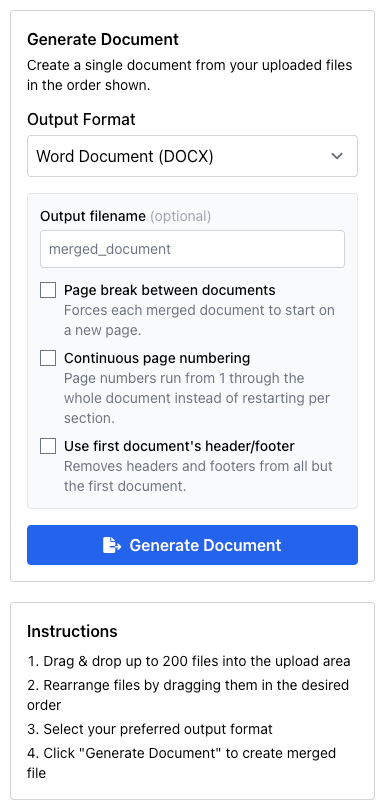
- DOCX and ePUB Options – For DOCX-only local uploads, control page breaks, page numbering, headers, footers, and output filename.
- Preview and History – Review local PDF results and re-download completed merges from your history.
Merge Airtable PDFs in a Predefined Order
Turn the PDF attachments already stored in Airtable into one finished payment order, client package, or record file without downloading and re-uploading documents.
1. Prepare Your Base
Create an attachment field for the finished PDF. Store source PDFs in one attachment field or in several attachment fields. When using several fields, their selected order becomes the merge order.
2. Select Records
Connect Airtable, choose a base, table, and optional saved view, then search and select the records to process. You can queue up to 50 records in one batch.
3. Generate and Write Back
Each record is validated and queued. ActiveMerge merges its PDFs, saves the result to your output attachment field, and shows the result in merge history. Airtable merges cost 5 credits per record.
Built for These Workflows
See how finance, legal, publishing, and operations teams use ActiveMerge to save hours every month.
Monthly Client Reports
Finance teams prepare client-facing packages every month: P&L statements, balance sheets, invoices, and supporting schedules — each in its own file.
With ActiveMerge, upload all of them, set the order, and generate one clean PDF. Instead of 12 separate attachments, your client receives a single professionally structured document covering everything in the right sequence.
Audit Submissions
Auditors need complete documentation packages — evidence files, trial balances, contracts, and approval records — in a specific, logical order. Disorganized submissions slow audits and create unnecessary back-and-forth.
Upload every piece of evidence, arrange it chronologically or by category, and produce one well-ordered submission. Everything is in one place, in the right order, from the moment the auditor opens the file.
Tax Preparation
Tax season means gathering dozens of receipts, bank statements, payslips, and expense reports scattered across email inboxes, cloud storage, and paper scans.
Merge them all into one organized PDF that you or your accountant can work through systematically. One file, in the order that makes sense for the filing, ready to submit.
Stakeholder Presentations
Presentations to leadership or investors often combine a narrative report, financial charts, exported slides, and appendices created in different tools by different team members.
Collect all the pieces, set the order, and generate one polished document. Everyone in the meeting receives the same file — in the same order — with nothing missing.
Vendor and Customer File Packages
Keeping complete records for each supplier or client is essential for compliance and dispute resolution. Contracts, invoices, delivery notes, and correspondence rarely arrive in one place.
Bundle everything into a single DOCX or PDF per relationship — easy to store, find, and produce on request for audits or legal matters.
Book and Report Compilation
Writers and publishers work on chapters stored in separate Word files. Assembling them manually is tedious, especially when each has its own page numbering.
ActiveMerge combines all chapters into a single DOCX or ePUB with continuous page numbering and consistent headers throughout. Publication-ready with no copy-pasting.
Merge Documents Programmatically
The ActiveMerge REST API gives your application full access to the document merge engine. Upload your files, choose your output format, and get back a secure temporary download URL valid for 24 hours.
- POST to
/api/document-merge/merge - Supports PDF, DOCX, and ePUB output
- All merge options via API: page breaks, numbering, headers & footers
- Secure expiring download URLs (24 hours)
- Works with any language or platform
- Authenticate with an API key
Frequently Asked Questions
What file types can I upload?
For PDF output: PDF (.pdf), Word (.docx), plain text (.txt), and images (.jpg, .jpeg, .png). For DOCX and ePUB output, all uploaded files must be Word documents (.docx).
How many files can I merge at once?
Up to 200 files in a single merge operation.
What is the maximum file size per document?
Each file can be up to 20 MB.
Can I merge Word files without losing formatting?
Yes. When you select DOCX output and upload .docx files, ActiveMerge uses a native Word merge engine that preserves styles, fonts, tables, and layout. No PDF conversion involved.
What does continuous page numbering do?
Normally each merged document restarts its page numbers from 1. Enabling this makes numbers run from 1 through the entire merged file as if it were always one document. DOCX and ePUB only.
What does “use first document header/footer” do?
When enabled, the header and footer from the first document are applied throughout the entire merged file. Headers and footers from subsequent documents are removed. DOCX and ePUB only.
Can I set a custom filename?
Yes. When using DOCX or ePUB output, type a custom filename before clicking Generate. The file downloads with that name.
Is there a REST API?
Yes. POST your files and get back a secure temporary download URL valid for 24 hours. All output formats and options are available via API. Authenticate with an API key from your account settings.
How long does the API download URL stay valid?
Download URLs generated via the API are valid for 24 hours after the merge completes.
Is there a free plan?
Yes. Sign up for a free account and start merging documents right away. No credit card required.
Ready to Merge Your Documents?
Join teams who use ActiveMerge to combine, organize, and deliver clean document packages faster. Get started free — no credit card required.