Every growing company eventually reaches a point where manual paperwork becomes a bottleneck. Contracts, HR documents, invoices, and client forms start to pile up, taking valuable time away from strategic work. This is where Document Automation Software steps in.
By automating how you create, manage, and share documents, your company can operate faster, smarter, and with far fewer errors.
Document automation isn’t just a convenience—it’s a transformation. It allows teams to focus on decision-making instead of repetitive admin work.
Whether you run a legal firm, a real estate agency, or a financial services company, investing in reliable Document Automation Software can drastically improve efficiency, accuracy, and scalability across departments.
Key Takeaways
Document Automation Software helps businesses save time, cut costs, and eliminate repetitive manual tasks. It improves collaboration, reduces compliance risks, and enhances customer experience. By integrating automation tools, companies can scale operations efficiently while maintaining consistency and accuracy in all documents. It also ensures secure data handling, faster approvals, and greater employee productivity—making it an essential investment for modern organizations aiming to work smarter.
What ActiveMerge’s Document Automation Software Does
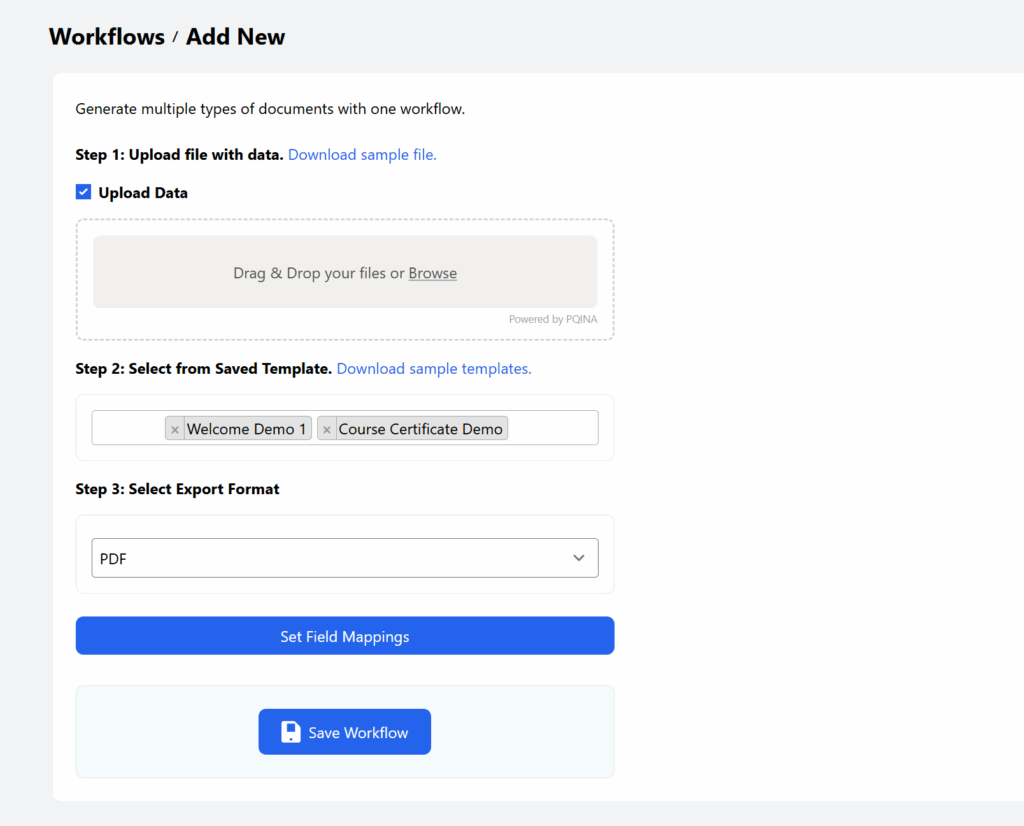
Document automation software takes a template — a contract, invoice, certificate, or report — and a data source, like a spreadsheet, form, or CRM, and merges them to generate finished, ready-to-send documents without manual copy-pasting. ActiveMerge is built specifically for this: upload a Word, PDF, or PowerPoint template, connect it to Excel, Google Sheets, your CRM, or a form, and generate hundreds of personalized PDF or Word documents in one pass.
What ActiveMerge Covers
- Template-based generation — use your existing Word, PDF, or PowerPoint templates with simple {placeholder} tags, no proprietary editor to learn.
- Bulk generation — generate one document per row from a spreadsheet, in PDF, DOCX, or PPTX format.
- AI OCR data extraction — pull structured data out of source documents like invoices instead of typing it in by hand.
- Document merging — combine multiple existing files into one consolidated PDF.
- Integrations — connect to Google Sheets, Airtable, Zapier, Make, and your CRM to trigger generation automatically.
Compared to enterprise document automation platforms built for large legal or sales-ops teams, ActiveMerge is built for solo founders, small teams, and agencies who need the same template-to-document workflow without the enterprise sales process, seat minimums, or implementation project. Ready to see it running on your own templates and data? Our document generation software page covers pricing, integrations, and a full walkthrough.
Why It Matters: 10 Benefits
1. Streamlines Document Creation
Creating documents manually is time-consuming and prone to mistakes. With Document Automation Software, you can generate contracts, proposals, and invoices instantly using pre-designed templates. These templates ensure that every document follows your company’s format, tone, and branding.
Imagine generating hundreds of client agreements or HR forms in minutes instead of hours. This not only saves time but ensures that every document is consistent and professional. By linking your company’s CRM or data systems to Document Automation Software, your team can automatically pull the right data into each document, ensuring accuracy from start to finish.

2. Reduces Human Error
Manual document handling often leads to small but costly mistakes—missing fields, outdated terms, or incorrect client information. Automation reduces these risks dramatically. Document Automation Software uses rule-based logic to ensure that every field is filled out correctly before submission or approval.
This not only prevents compliance issues but also enhances your company’s reputation for accuracy and reliability. When employees no longer have to double-check every document line by line, they can focus more on value-driven tasks like client engagement or process improvement.
3. Saves Time and Operational Costs
Time is one of the most valuable assets in business. Every hour spent manually creating or reviewing documents is an hour lost from strategic growth. With automation, tasks that once took days can now be done in minutes.
By minimizing manual work, Document Automation Software helps companies cut labor costs and reallocate staff to more critical tasks. Over time, this efficiency compounds—reducing operational expenses and increasing profitability. Many organizations find that automation pays for itself within months of implementation.

4. Enhances Collaboration and Workflow
In most companies, documents pass through multiple hands before approval. This back-and-forth process often leads to delays and miscommunication. Automation tools simplify this process by providing centralized document management and real-time collaboration.
Teams can comment, review, and approve documents simultaneously—no more endless email threads or version confusion. The workflow feature in Document Automation Software allows for smooth transitions between departments, ensuring everyone stays aligned and updated. This creates a culture of efficiency and accountability across your organization.
5. Improves Compliance and Reduces Risk
Compliance is one of the biggest challenges businesses face, especially in regulated industries such as finance, healthcare, and law. Manual document handling increases the risk of missing essential legal clauses or using outdated templates.
Document Automation Software ensures compliance by using pre-approved templates that automatically include all necessary legal and regulatory requirements. Audit trails, digital signatures, and version histories make it easier to track every change and maintain transparency.
In a world where compliance mistakes can lead to heavy fines or reputational damage, automation becomes your safety net. It helps you maintain control and stay compliant with minimal effort.
6. Enhances Data Security
Security breaches often occur through human error or unsecured document sharing. With Document Automation Software, documents are encrypted, stored securely, and accessible only by authorized users.
Advanced access control ensures that only the right people can view or edit sensitive information. Integration with secure cloud systems also allows companies to manage permissions easily, track user activity, and prevent unauthorized access. This gives peace of mind, especially when dealing with confidential contracts or client data.
7. Promotes Scalability
As your business grows, so does your document volume. Scaling manual processes isn’t just inefficient—it’s impossible without significant cost increases. Automation eliminates this bottleneck.
Once your templates and rules are set, the Document Automation Software can handle thousands of documents effortlessly. Whether you’re onboarding hundreds of new employees or managing multiple client contracts at once, automation scales with your business needs without adding administrative stress.

8. Enhances Customer Experience
Customers expect fast and professional service. Slow contract delivery or inconsistent communication can affect your company’s image. Automation helps you meet customer expectations effortlessly.
With Document Automation Software, clients receive accurate, personalized documents instantly. Automated workflows speed up approvals and digital signing, ensuring faster turnarounds and smoother transactions. The result is a more seamless experience for customers—and stronger relationships for your business.
9. Increases Productivity and Employee Satisfaction
Employees often feel drained by repetitive administrative tasks. Automating document workflows reduces that burden, giving staff more time for creative, analytical, or relationship-building work.
When employees spend less time on routine paperwork, they feel more engaged and motivated. Document Automation Software supports productivity by simplifying document management, enabling staff to achieve more in less time while maintaining quality standards.
10. Offers Insightful Analytics and Reporting
One of the hidden advantages of Document Automation Software is its ability to generate insights. You can monitor document lifecycles, identify bottlenecks, and analyze approval times—all within the same platform.
This visibility helps business leaders make data-driven decisions, improve processes, and forecast needs more accurately. When you understand how your documentation flows, you can continuously refine operations for even greater efficiency.
Frequently Asked Questions (FAQ)
- What is Document Automation Software?
Document Automation Software is a tool that automates the creation, management, and delivery of business documents using templates and integrated data sources. - Can it integrate with other tools like CRM or HR systems?
Yes. Most modern Document Automation Software integrates easily with CRM, HR, accounting, and cloud storage tools for smooth data synchronization. - Is it secure for handling confidential information?
Absolutely. It uses encryption, access control, and cloud security measures to protect sensitive data from unauthorized access. - How long does it take to set up Document Automation Software?
Setup time depends on company size and document complexity. However, most systems are user-friendly and can be implemented in just a few days or weeks. - Does automation replace human oversight?
No. Automation supports humans by handling repetitive tasks while employees focus on reviewing, approving, and improving document quality.
Conclusion
Document automation is no longer an optional upgrade—it’s a competitive advantage. Companies that adopt Document Automation Software streamline operations, improve accuracy, and strengthen compliance across all levels.
The time saved and efficiency gained directly translate to higher productivity and better customer satisfaction. Whether you’re a small business or a large enterprise, automation empowers your team to focus on what truly matters—innovation and growth.
Start transforming your document processes with reliable automation solutions today. Explore Document Automation Software at ActiveMerge to discover how your company can simplify document management, reduce risks, and scale operations with confidence.