

If you’ve ever opened a tool and immediately wondered where to click first, you already understand the problem ActiveMerge set out to fix.
The latest update to the document generation flow is all about making the experience clearer.
Instead of putting everything on one crowded screen, ActiveMerge now breaks the document generation process into separate pages for each step. That shift sounds small, but it changes the feel of the whole workflow. Users can move through the job one decision at a time, without staring at a wall of options and data.
A simpler path from template to output
The process still starts the same way: click Start New Job.
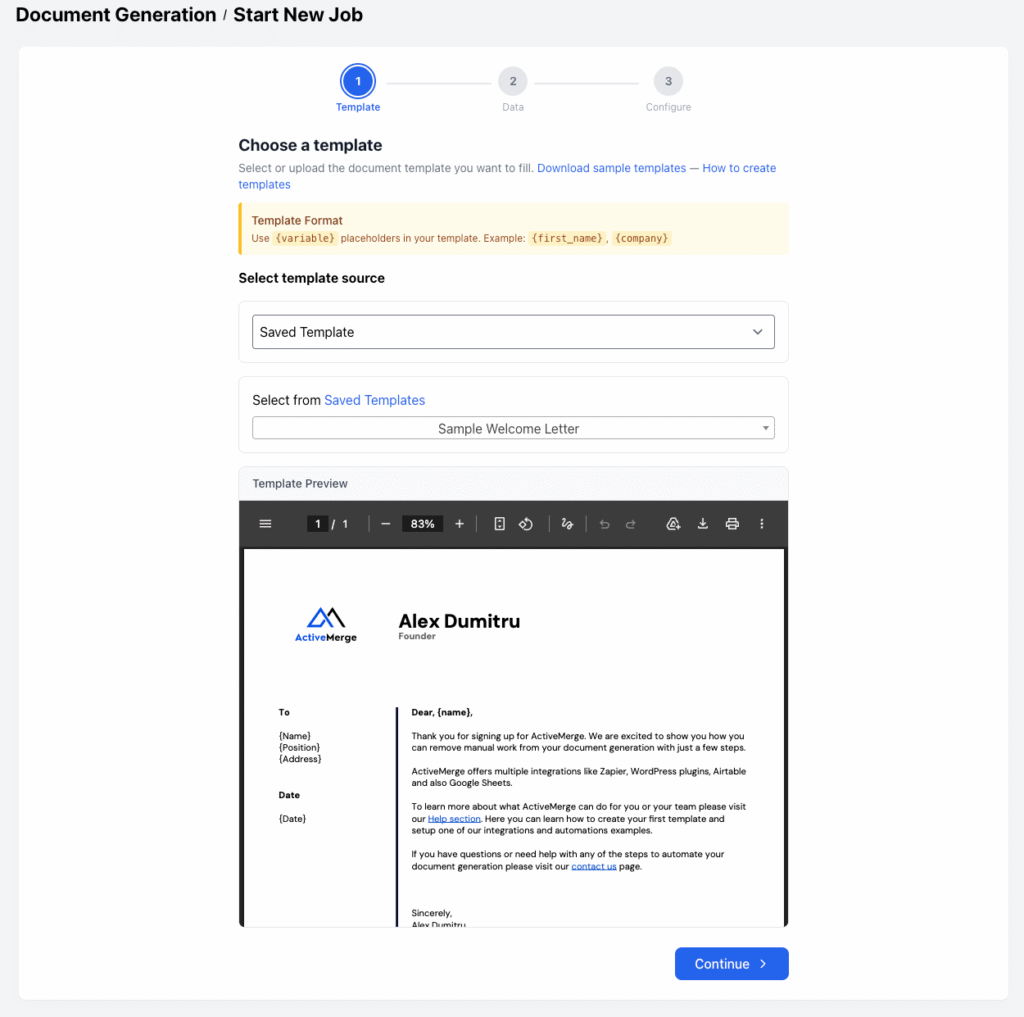
From there, ActiveMerge now guides you through the setup in stages. You can still choose between Google Drive templates or uploading a template from your device. You can also preview the template before moving forward, which helps confirm that you’ve picked the right file before you spend time mapping fields or generating output.
If you’re creating a template from scratch, the rule is straightforward: use variables wrapped in curly braces, like {name}. Don’t include spaces. Underscores are allowed. That’s the basic format, and it keeps the template flexible without making it complicated.
Field mapping got easier
One of the biggest practical changes is in field mapping.
In the older flow, users had to deal with a lot of information in one place, which made the process easier to misunderstand. Now, ActiveMerge has improved that step and added AI-assisted mapping. That means the app can help connect the data to the placeholders automatically, reducing the amount of manual setup required.
For anyone trying to move quickly, that matters. Less manual mapping means fewer chances to get stuck and fewer small errors that can slow down a job. The rest of the familiar options are still there too, including custom file names.

Preview, confirm, generate
The updated flow also makes the final steps feel more intentional.
After selecting sample data and choosing an export format like PDF, you can move forward to see the current job details. That includes credit usage and available credits, so you know what the job will cost before you commit.
Once you confirm, ActiveMerge generates the files. From there, you can download the result or save it. If you want to keep going, ActiveMerge also leaves room for other actions like starting an email campaign.
Why this update matters
The main takeaway is simple: the app now feels easier to follow.
Instead of asking users to absorb too much at once, ActiveMerge now leads them through a clearer sequence. That makes the experience more approachable, especially for users who are new to the tool or just want to get a document out quickly without digging through clutter.
This is the kind of update that doesn’t just change how the app looks. It changes how it feels to use.
FAQ
What changed in the ActiveMerge document generation flow?
The process was split into multiple pages instead of one crowded screen, making each step easier to follow.
Can I still use Google Drive templates or upload my own?
Yes. Both options are still available.
How do I format variables in a template?
Use curly braces, like {variable_name}. Don’t use spaces. Underscores are allowed.
Does ActiveMerge support previewing templates?
Yes. The updated flow includes a template preview before you continue.
What’s new in field mapping?
ActiveMerge has improved field mapping, and it now uses AI to help map data to placeholders more easily.

