
Send documents for eSignature in seconds right from ActiveMerge
Generate a document, add your signers, and send all from one place.
No switching tools, no copy-pasting links. Your signed PDFs land back exactly where you need them.
Everything you need for legally binding e-signatures:
- Bulk signing — Generate documents and send each one to a different signer in a single job
- Meet Compliance Standards – E-signature module complies with ESIGN and UETA regulations, so your signed documents meet legal and security standards.
- Multi-party signing — Add as many signers as needed, each receiving their own personalised signing link
- Signing order — Control who signs first with ordered signing sequences
- Automatic completion emails — All parties receive the signed PDF the moment the document is fully executed
- Audit trail — Every signature includes a timestamp and IP address

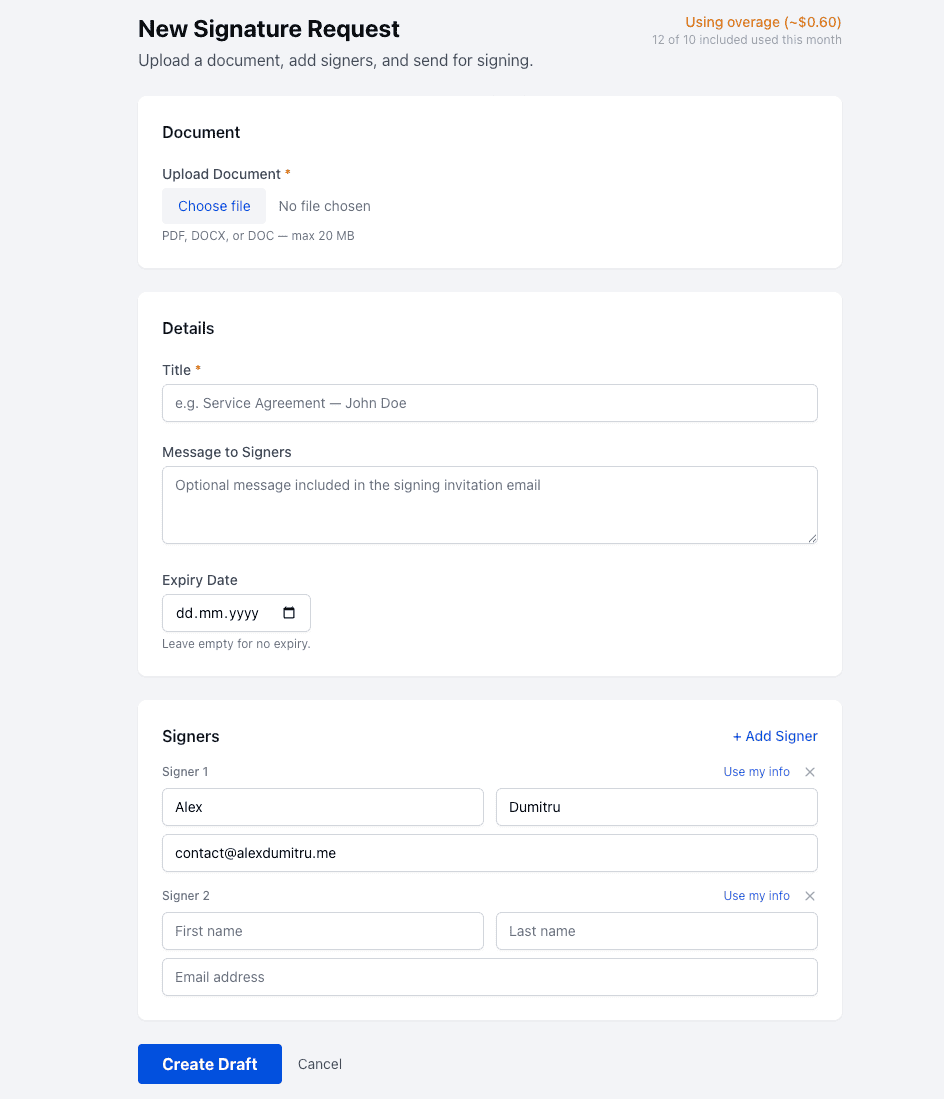
Three steps from document to signed
1. Generate & Send
Upload a PDF or use any document you’ve already generated in ActiveMerge. Add your signers — name and email — set an optional expiry date, and hit Send. Each signer gets a branded email with their personal signing link.
2. Sign from Any Device
Signers open their link on any browser, on any device. No account required, no app to download. The document opens in a clean, guided interface where they review, fill in fields, and sign with a click.
3. Get the Signed Copy
The moment everyone has signed, you and all signers automatically receive the completed PDF by email. If you generated the document from Notion or Airtable, the signed file writes back to the source row automatically.

Integrations

Generate Documents & Collect E-Signatures in One Workflow

More features:
- Per-signer confirmations — Each signer gets an immediate confirmation when their signature is recorded, with a status on how many others still need to sign
- Real-time status tracking — See exactly who has opened, signed, or declined — from your dashboard
- Embedded signing — Signers never leave their email or your page. The signing experience loads inline, no redirects
- Reusable templates — Build a signing template from any PDF, place signature fields once, and reuse it across hundreds of documents
- Notion write-back — Signed PDFs are automatically uploaded to the corresponding Notion database row when generation and signing are connected
- Webhook notifications — Receive a
signature_request.completedevent to any endpoint the moment a document is fully signed - Expiry dates — Set a deadline for signing. Expired requests are automatically closed
- Cancellation — Cancel any in-progress request from your dashboard at any time
Use Cases
Sales contracts
Generate a personalised service agreement from your CRM data, send it for signature, and have the executed copy land back in your Notion deal tracker — automatically.
HR & onboarding
Send offer letters, NDAs, and policy acknowledgements to new hires. Track who has signed and follow up on anyone who hasn’t opened the link yet.
Client proposals
Turn your proposal template into a signable document in one click. No more downloading, printing, scanning, or emailing PDFs back and forth.
Bulk agreements
Need 200 customers to sign an updated terms document? Generate all 200 personalised copies and send them for signing in a single job.
Frequently asked questions
Do signers need an ActiveMerge account? No. Signers receive a link by email and sign directly in their browser. They don’t need to create an account or install anything.
Are the signatures legally binding? Yes. Each signature includes a timestamp, IP address, and audit trail, meeting the requirements of electronic signature laws in most jurisdictions including eIDAS (EU) and ESIGN/UETA (US).
Can I send one document to multiple signers? Yes. You can add as many signers as needed to a single document. You can also require them to sign in a specific order.
What file formats are supported? PDF documents. If you’re generating documents in ActiveMerge (DOCX, PPTX), the generated output can be sent directly for signing.
What happens if a signer declines? The request is immediately marked as declined and you’re notified. The document is closed for all other signers.
Can I use my own document templates? Yes. The Template Editor lets you upload any PDF, place signature and date fields visually, and save it as a reusable template for future requests.
Does it work with Notion and Airtable? Yes. When you generate documents from a Notion or Airtable data source and enable write-back, the signed PDF is automatically uploaded back to the corresponding row when signing is complete.
What happens if the signing link expires? You can set a custom expiry date on each request. Once expired, the link becomes inactive and you can send a new request if needed.
Can I cancel a request after sending? Yes. Any sent or partially-signed request can be cancelled from your dashboard at any time.