
AI OCR Data Extraction and Merging
Our AI OCR (Optical Character Recognition) tool has been integrated into the document generation software and allows users to extract data from invoices and other documents to use in generating new documents.
The OCR tool is automatically available to all users when starting a new document generation job.
How it works?
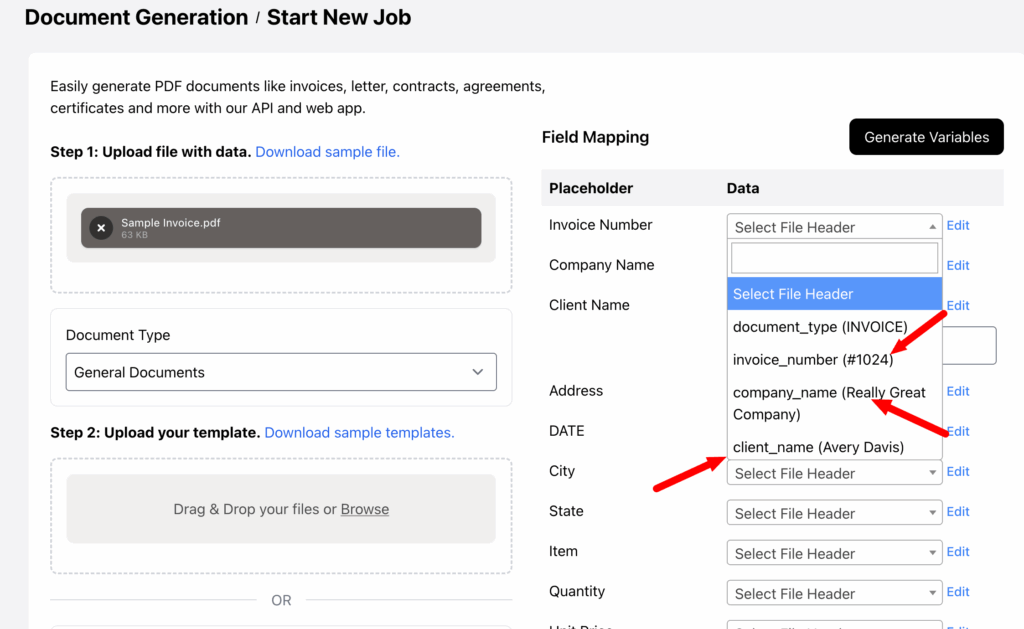
Select a a document, for example and invoice as a data source, and click the Set Field Mappings button.
The data is validated and now you can use the “select mappings” feature, which displays the data extracted from the document.
The system currently works best with tabular data, with more document types to be supported soon.
Once the data is extracted, fields are automatically populated, but users can also edit any field or add custom text if needed.
Quick Video Demo
Once the data extraction is completed you can select the data you need.
The fields also support custom data where needed.